Unit - 1
INTRODUCTION
1. Introduction to Software Engineering
1.1 Engineering Fundamentals
1.1.1 Definition of Engineering
- Engineering is the application of scientific knowledge, mathematics, and practical experience to design and build systems that solve real-world problems.
- It involves:
- Analysis
- Design
- Construction
- Testing
- Maintenance
- Engineering focuses on efficiency, safety, reliability, and cost-effectiveness.
- It transforms theoretical concepts into practical solutions.
- Core aspects:
- Creativity
- Optimization
- Risk management
- Problem-solving
Engineering is not just building — it is designing under constraints such as:
- Budget
- Time
- Resources
- Safety
- Performance
1.1.2 Application of Science, Tools and Methods
Engineering uses:
- Scientific principles
- Mathematical modeling
- Analytical methods
- Technical tools
In practice, engineering involves:
- Requirements analysis
- Design modeling
- Simulation
- Testing procedures
Tools may include:
- Design software
- Programming languages
- Testing frameworks
- Project management systems
The key idea:
Engineering applies structured knowledge using appropriate tools to achieve reliable solutions.
1.1.3 Cost-Effective Problem Solving
Engineering solutions must be:
- Technically sound
- Economically viable
Cost-effectiveness includes:
- Development cost
- Maintenance cost
- Operational cost
- Long-term sustainability
A solution is not good engineering if:
- It works but is too expensive
- It is efficient but difficult to maintain
Engineering seeks optimal balance between:
- Quality
- Performance
- Cost
- Time
1.2 Definition of Software Engineering
Software Engineering is:
The systematic, disciplined, and quantifiable approach to the development, operation, and maintenance of software.
It combines:
- Engineering principles
- Computer science
- Project management
- Quality assurance
Software engineering emerged due to:
- Increasing software complexity
- Software crisis (late 1960s)
- High failure rates of large projects
1.2.1 Systematic Approach
A systematic approach means:
- Following structured processes
- Using defined methodologies
- Planning before coding
Includes:
- Requirements gathering
- Design documentation
- Testing strategies
- Version control
Software should not be written randomly — it must follow a defined process.
1.2.2 Disciplined Development
Disciplined development ensures:
- Standards are followed
- Coding guidelines are maintained
- Documentation is produced
- Reviews are conducted
It avoids:
- Ad-hoc coding
- Uncontrolled changes
- Poor quality output
Discipline ensures:
- Predictability
- Reliability
- Maintainability
1.2.3 Quantifiable Methods
Software engineering uses measurable metrics such as:
- Lines of Code (LOC)
- Function points
- Defect density
- Productivity rates
- Testing coverage
- Performance benchmarks
Quantification allows:
- Performance evaluation
- Cost estimation
- Risk assessment
- Quality control
Without measurement:
- Improvement is impossible
- Planning becomes inaccurate
1.2.4 Development, Operation and Maintenance
Software engineering covers the entire lifecycle:
- Development
- Requirements
- Design
- Implementation
- Testing
- Operation
- Deployment
- User support
- Monitoring
- Maintenance
- Bug fixes (Corrective)
- Environment adaptation (Adaptive)
- Enhancements (Perfective)
- Code improvement (Preventive)
Maintenance often consumes:
- 60–80% of total software cost.
Software engineering ensures software remains:
- Reliable
- Scalable
- Maintainable
- Efficient throughout its life.
2. Changing Nature of Software
Software has evolved from simple standalone programs to complex, distributed, intelligent systems. Modern software must be:
- Scalable
- Secure
- Networked
- Adaptive
- Continuously updated
The nature of software changes due to:
- Technological advancement
- User expectations
- Internet expansion
- Cloud computing
- Artificial Intelligence
2.1 Categories of Software
Software can be categorized based on its purpose and usage environment.
2.1.1 System Software
- Manages hardware and provides a platform for application software.
- Acts as an interface between hardware and user applications.
- Examples:
- Operating Systems (Windows, Linux)
- Device Drivers
- Compilers
- Assemblers
- Characteristics:
- Performance-critical
- Resource management
- Close to hardware
- Highly optimized and often written in low-level languages.
System software ensures:
- Memory management
- Process scheduling
- File handling
- Security control
2.1.2 Application Software
- Designed to help users perform specific tasks.
- Built on top of system software.
- Examples:
- Word processors
- Browsers
- Accounting systems
- Mobile apps
- Focus:
- User interface
- Business logic
- Usability
Application software changes rapidly due to:
- Market demands
- User feedback
- Competitive features
2.1.3 Engineering and Scientific Software
- Used for complex mathematical and scientific computations.
- High accuracy and precision required.
- Examples:
- Simulation systems
- CAD tools
- Weather modeling
- Space research software
- Often involves:
- Numerical analysis
- Statistical modeling
- Algorithm optimization
Characteristics:
- Heavy computational processing
- Visualization tools
- High reliability requirements
2.1.4 Embedded Software
- Software built into hardware devices.
- Controls machines and devices.
- Examples:
- Washing machines
- Automobiles
- Medical equipment
- IoT devices
- Characteristics:
- Real-time operation
- Limited memory and processing power
- High reliability
- Often written in C/C++.
Embedded software must:
- Respond within strict time constraints
- Be highly efficient
- Operate with minimal resources
2.1.5 Product-Line Software
- Designed for mass-market use.
- Built as a product rather than for a specific client.
- Examples:
- Microsoft Office
- Adobe Photoshop
- Antivirus software
- Features:
- Configurable options
- Wide user base
- Regular updates
- Emphasizes:
- User experience
- Scalability
- Market competitiveness
2.1.6 Web Applications
- Software accessed via web browsers.
- Runs on remote servers.
- Examples:
- E-commerce websites
- Online banking
- Social media platforms
- Characteristics:
- Client-server architecture
- Cloud deployment
- Continuous integration & deployment
- Must handle:
- Large traffic
- Security threats
- Data privacy
Modern web applications:
- Use APIs
- Support mobile integration
- Operate globally
2.1.7 Artificial Intelligence Software
- Software capable of learning, reasoning, and decision-making.
- Uses:
- Machine learning
- Neural networks
- Natural language processing
- Examples:
- Chatbots
- Recommendation systems
- Autonomous vehicles
- Image recognition systems
- Characteristics:
- Data-driven
- Adaptive
- Continuous improvement
AI software differs because:
- Behavior evolves over time
- Requires training datasets
- Needs large computational resources
Summary of Changing Nature
| Category | Focus | Key Feature |
|---|---|---|
| System Software | Hardware control | Performance |
| Application Software | User tasks | Usability |
| Engineering Software | Scientific computation | Precision |
| Embedded Software | Device control | Real-time |
| Product-Line Software | Mass market | Scalability |
| Web Applications | Online access | Connectivity |
| AI Software | Intelligence | Learning capability |
Software today is:
- Distributed
- Data-driven
- Continuously evolving
- Highly interconnected
3. Legacy Software
Legacy software refers to old software systems that are still in use but are difficult to maintain, modify, or extend.
These systems often:
- Run critical business operations
- Use outdated technologies
- Lack proper documentation
- Are expensive to maintain
Despite their limitations, organizations continue using them because:
- Replacing them is costly
- They still function reliably
- Business processes depend on them
3.1 Characteristics of Legacy Systems
3.1.1 Older Programs
- Developed using outdated programming languages or technologies.
- Examples:
- COBOL systems in banks
- Mainframe applications
- Often built decades ago.
- May run on obsolete hardware.
Challenges:
- Lack of modern compatibility
- Difficulty integrating with new systems
- Scarcity of skilled developers familiar with old technologies
3.1.2 Poor Quality
- May not follow modern software engineering practices.
- Common issues:
- High defect density
- Poor modularity
- Code duplication
- Lack of version control during development.
Impact:
- Increased maintenance cost
- Higher risk of failure
- Reduced system reliability
3.1.3 Inextensible Design
- Designed without future scalability in mind.
- Tight coupling between components.
- Hard-coded configurations.
Consequences:
- Difficult to add new features
- Complex integration with modern systems
- Risk of breaking existing functionality
Legacy systems often lack:
- Modular architecture
- API interfaces
- Microservices structure
3.1.4 Convoluted Code
- Code is complex, tangled, and difficult to understand.
- May contain:
- Deep nesting
- Spaghetti code
- Global variable misuse
- Poor naming conventions.
Example of Convoluted Structure (Conceptual):
This creates:
- Circular dependencies
- Hard-to-trace logic
- Debugging difficulty
3.1.5 Poor Documentation
- Missing or outdated documentation.
- No clear system design records.
- Developers must rely on reading code.
Types of missing documentation:
- Requirement specifications
- Design diagrams
- API documentation
- Test cases
Impact:
- Onboarding new developers becomes difficult
- Maintenance becomes slow and error-prone
3.1.6 Testing Limitations
- Lack of automated testing.
- Minimal or no unit tests.
- Manual testing practices.
Common issues:
- No regression testing
- No test coverage metrics
- Limited test environments
Result:
- High risk during modifications
- Fear of changing code
- Increased technical debt
Why Legacy Software Persists
Organizations continue using legacy systems because:
- They are mission-critical
- Migration is expensive
- Risk of business disruption
Risks of Legacy Software
| Risk | Explanation |
|---|---|
| Security vulnerabilities | Outdated security patches |
| Performance issues | Inefficient architecture |
| Scalability problems | Not designed for growth |
| Integration difficulty | Poor API support |
| Knowledge loss | Experts retiring |
Modern Approaches to Handle Legacy Systems
- Refactoring
- Re-engineering
- Wrapping with APIs
- Gradual migration
- System replacement
Summary
Legacy software is:
- Old but operational
- Hard to maintain
- Expensive to modify
- Risky to replace
It represents a major challenge in software engineering because:
Maintaining old systems is often more difficult than building new ones.
4. Software Characteristics
Software differs fundamentally from hardware. Understanding its nature is essential in software engineering because many management, maintenance, and cost decisions depend on these characteristics.
4.1 Nature of Software
4.1.1 Software is Developed, Not Manufactured
Unlike hardware, software is engineered and developed, not physically manufactured.
In hardware:
- Once designed, each additional unit has production cost.
- Manufacturing cost dominates.
In software:
- Development cost is high.
- Copying cost is nearly zero.
- No physical assembly line.
Key Differences:
| Hardware | Software |
|---|---|
| Manufactured repeatedly | Developed once |
| Per-unit production cost | Near-zero replication cost |
| Physical assembly | Logical construction |
Implication:
- Most cost lies in design, coding, testing, and maintenance.
- Software economics differ from traditional engineering economics.
4.1.2 Software Does Not Wear Out
Hardware:
- Physically deteriorates over time.
- Follows a “bathtub curve.”
Software:
- Does not physically degrade.
- Fails due to:
- Bugs
- Design flaws
- Environmental changes
- Modifications
Software “ages” because:
- Requirements change.
- Patches introduce new defects.
- Complexity increases over time.
Thus:
Software deteriorates due to changes, not usage.
4.1.3 Custom-Built Software
Historically:
- Software was custom-developed for specific clients.
- Each system built from scratch.
Characteristics:
- High development time
- High cost
- Unique architecture
Modern shift:
- More reusable frameworks
- Product-line software
- Libraries and APIs
However, many enterprise systems remain partially custom-built.
4.1.4 Component-Based Assembly
Modern software increasingly uses:
- Prebuilt components
- Libraries
- APIs
- Frameworks
Instead of writing everything from scratch, developers:
- Assemble components
- Integrate modules
- Configure existing tools
Examples:
- Using authentication libraries
- Payment gateway APIs
- Database drivers
Advantages:
- Reduced development time
- Improved reliability
- Reuse of tested modules
Limitation:
- Dependency management complexity
- Compatibility issues
4.2 Failure Curves
Failure curves explain how systems fail over time.
4.2.1 Hardware Failure Curve

Hardware typically follows a Bathtub Curve:
Phases:
- Infant Mortality Phase
- Early failures due to manufacturing defects.
- Normal Life Phase
- Low, steady failure rate.
- Wear-Out Phase
- Failures increase due to physical aging.
This is called the bathtub curve because of its shape.
4.2.2 Software Failure Curve


Software does NOT follow bathtub behavior.
Initial phase:
- High failure rate (bugs present).
After debugging:
- Failure rate decreases significantly.
Key difference:
- No wear-out phase.
- Failure rate increases only if modifications introduce errors.
Thus:
Software failures arise from design faults, not physical deterioration.
4.2.3 Idealized vs Actual Curve
Idealized Curve:
- After debugging, failure rate becomes almost zero.
- Stable over time if no changes made.
Actual Curve:
- Each modification may introduce new defects.
- Failure rate increases with poor maintenance.
- System complexity grows over time.
Conceptual comparison:
Reality:
- Software requires continuous maintenance.
- Without disciplined engineering, reliability declines.
Summary of Software Characteristics
| Characteristic | Meaning |
|---|---|
| Developed, not manufactured | Cost concentrated in development |
| Does not wear out | Fails due to design changes |
| Custom-built | Designed for specific needs |
| Component-based | Built using reusable modules |
Key Exam Points
- Software cost is mainly development and maintenance.
- Software does not physically degrade.
- Failure rate increases due to poor maintenance.
- Hardware and software failure curves are fundamentally different.
5. Software Applications
Software applications are developed to solve specific problems across different domains. Based on functionality and usage environment, applications are categorized into different types.
5.1 Types of Applications
5.1.1 System Software
- Software that manages hardware and provides a platform for other software.
- Acts as an interface between user applications and hardware.
- Examples:
- Operating Systems (Windows, Linux)
- Compilers
- Device Drivers
- File Management Systems
- Responsibilities:
- Memory management
- Process scheduling
- Resource allocation
- Security control
- Typically performance-critical and system-level.
5.1.2 Real-Time Software
- Software that must respond within a fixed time constraint.
- Correctness depends on both:
- Logical result
- Time at which result is produced
Types:
- Hard Real-Time
- Strict deadline
- Failure unacceptable
- Example: Air traffic control
- Soft Real-Time
- Some delay acceptable
- Example: Video streaming
Characteristics:
- Deterministic response
- High reliability
- Low latency
5.1.3 Business Software
- Used for commercial and organizational operations.
- Examples:
- Payroll systems
- Inventory management
- Banking software
- ERP systems
- Focus:
- Data processing
- Transaction handling
- Reporting
- Requires:
- Accuracy
- Security
- Scalability
5.1.4 Engineering and Scientific Software
- Used for complex mathematical and scientific computations.
- Examples:
- Simulation software
- CAD systems
- Weather forecasting models
- Characteristics:
- Numerical computation
- High precision
- Graphical visualization
- Used in:
- Research institutions
- Space agencies
- Manufacturing industries
5.1.5 Embedded Software
- Integrated into hardware devices.
- Controls machine functions.
- Examples:
- Microwave controllers
- Automotive engine control units
- Medical devices
- Characteristics:
- Resource-constrained
- Real-time processing
- High reliability
- Often written in low-level languages.
5.1.6 Personal Computer Software
- Designed for individual users.
- Runs on desktops or laptops.
- Examples:
- Word processors
- Media players
- Graphic design tools
- Focus:
- User interface
- Ease of use
- Performance
- Often commercial and product-based.
5.1.7 Web-Based Software
- Applications accessed through web browsers.
- Runs on remote servers.
- Examples:
- E-commerce websites
- Online banking systems
- Social media platforms
- Characteristics:
- Client-server architecture
- Internet-dependent
- Continuous deployment
- Must handle:
- Security threats
- Scalability
- Global users
5.1.8 Artificial Intelligence Software
- Software capable of learning and decision-making.
- Uses:
- Machine Learning
- Neural Networks
- Natural Language Processing
- Examples:
- Chatbots
- Recommendation systems
- Autonomous vehicles
- Characteristics:
- Data-driven
- Adaptive behavior
- Continuous improvement
- Requires large datasets and computational power.
Summary Table
| Application Type | Primary Focus | Example |
|---|---|---|
| System Software | Hardware management | OS |
| Real-Time Software | Time-bound response | Air traffic system |
| Business Software | Transaction processing | Banking |
| Engineering Software | Scientific computation | Simulation tools |
| Embedded Software | Device control | IoT devices |
| PC Software | Individual use | MS Word |
| Web-Based Software | Internet services | E-commerce |
| AI Software | Intelligent behavior | Chatbots |
6. Software Engineering as a Layered Technology
Software Engineering is described as a layered technology because it is built upon multiple structured layers, each supporting the one above it.
The layered approach ensures:
- Quality
- Discipline
- Consistency
- Continuous improvement
6.1 Layers of Software Engineering
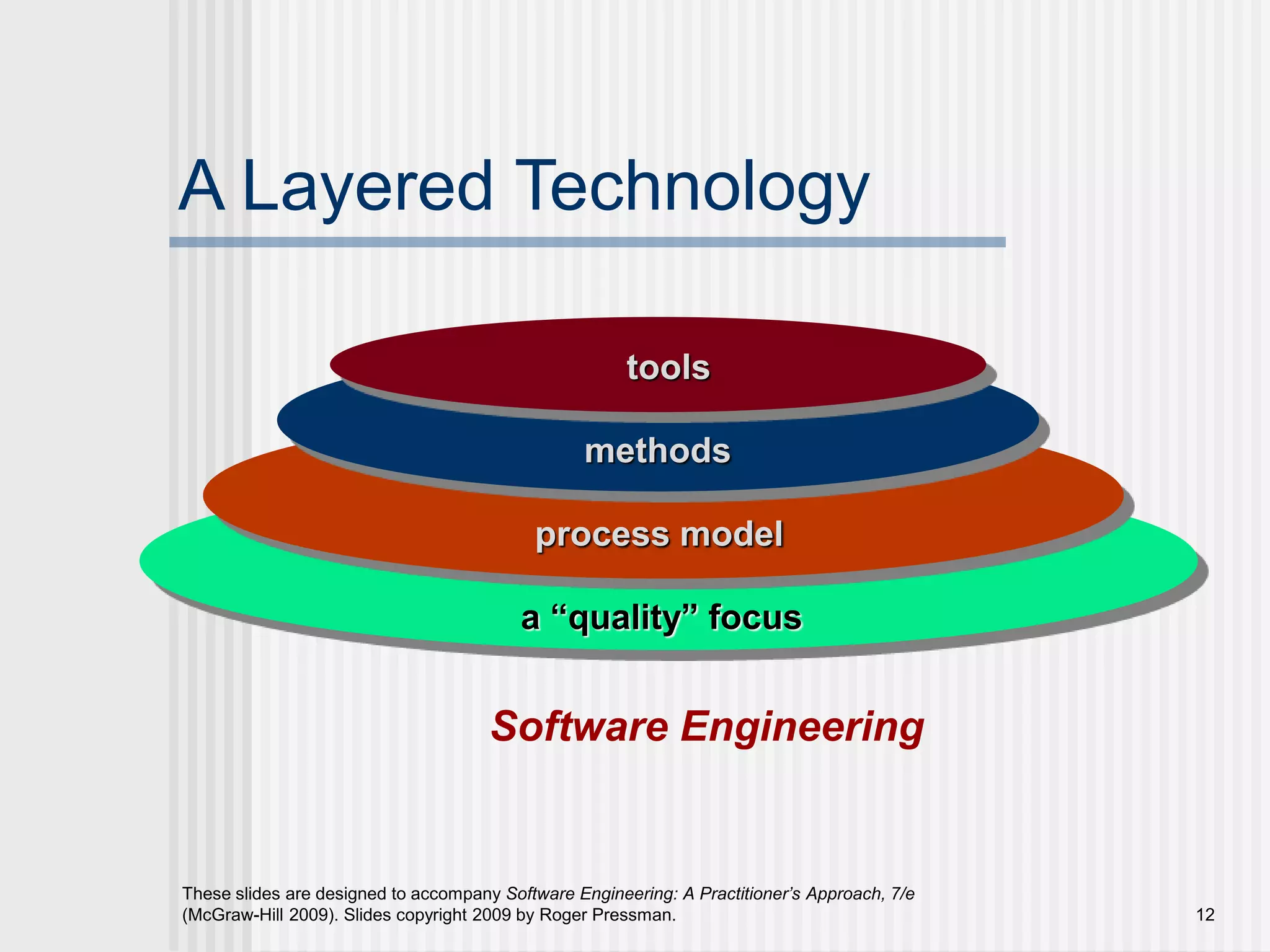

The four fundamental layers are:
- Quality Focus (Foundation)
- Process
- Methods
- Tools
The foundation is quality — everything else is built upon it.
6.1.1 A Quality Focus
- The foundation of software engineering.
- Ensures that:
- Standards are followed
- Defects are minimized
- Customer satisfaction is achieved
- Includes:
- Quality assurance (QA)
- Quality control (QC)
- Reviews and audits
- Quality must be:
- Planned
- Managed
- Measured
- Without quality focus:
- Processes become ineffective
- Products become unreliable
Key idea:
Quality is not added later; it is built into every layer.
6.1.2 Process
- Defines the framework for software development.
- Provides structure and discipline.
- Describes:
- Activities
- Tasks
- Milestones
- Deliverables
- Examples:
- Waterfall Model
- Agile Model
- Spiral Model
Process answers:
- What should be done?
- When should it be done?
- Who should do it?
A well-defined process ensures:
- Predictability
- Repeatability
- Controlled development
6.1.3 Methods
- Provide technical guidelines for building software.
- Describe how to:
- Perform requirements analysis
- Design system architecture
- Write code
- Conduct testing
- Examples:
- UML modeling
- Data flow diagrams
- Design patterns
- Testing strategies
Methods translate process activities into actionable techniques.
6.1.4 Tools
- Provide automated or semi-automated support.
- Help implement methods efficiently.
- Examples:
- IDEs (PyCharm)
- Version control (Git)
- Testing frameworks
- CI/CD tools
- CASE tools
Tools improve:
- Productivity
- Accuracy
- Speed
But important:
Tools alone cannot ensure quality without proper process and methods.
Relationship Between Layers
- Quality supports Process.
- Process defines how Methods are applied.
- Methods are supported by Tools.
Key Exam Points
- Software engineering is layered technology.
- Quality is the foundation.
- Process provides structure.
- Methods provide technical solutions.
- Tools provide automation.
- All layers must work together.
7. Generic View of Software Engineering
The Generic View of Software Engineering describes software development as a set of structured phases that span the entire life cycle of a system.
It divides software engineering into three major phases:
- Definition Phase
- Development Phase
- Support Phase
This model emphasizes that software engineering is not only about coding but also about planning, analysis, and long-term maintenance.
7.1 Phases of Software Engineering
7.1.1 Definition Phase
The Definition Phase focuses on understanding what needs to be built.
Primary objectives:
- Identify customer requirements
- Define system scope
- Analyze feasibility
- Estimate cost and time
7.1.1.1 System/Information Engineering
- Concerned with the overall system architecture.
- Defines how software interacts with:
- Hardware
- Databases
- External systems
- Focuses on system-level requirements.
Activities include:
- Requirement gathering
- System modeling
- Identifying constraints
It ensures that:
- The software fits into the larger system environment.
- Interfaces are properly defined.
7.1.1.2 Software Project Planning
- Establishes a roadmap for development.
- Defines:
- Budget
- Schedule
- Resource allocation
- Risk management
Planning answers:
- How long will it take?
- How much will it cost?
- Who will work on it?
Includes:
- Cost estimation
- Timeline creation
- Team assignment
- Risk analysis
Effective planning reduces:
- Delays
- Budget overruns
- Project failure
7.1.1.3 Requirements Analysis
- Detailed study of user needs.
- Produces:
- Software Requirement Specification (SRS)
Types of requirements:
- Functional Requirements
- Non-Functional Requirements
Activities:
- Interviews
- Surveys
- Prototyping
- Feasibility study
Importance:
Incorrect requirements lead to project failure.
7.1.2 Development Phase
The Development Phase focuses on building the software.
7.1.2.1 Software Design
Transforms requirements into:
- System architecture
- Module structure
- Interface design
- Data structures
Types of design:
- High-Level Design (HLD)
- Low-Level Design (LLD)
Design ensures:
- Modularity
- Scalability
- Maintainability
Good design reduces:
- Complexity
- Future maintenance cost
7.1.2.2 Code Generation
- Actual implementation of the design.
- Converts design into programming language instructions.
- Follows coding standards.
- Uses version control systems.
Key aspects:
- Readability
- Efficiency
- Error handling
- Security practices
Poor coding leads to:
- High defect rate
- Maintenance difficulty
7.1.2.3 Software Testing
- Verifies that the software works correctly.
- Identifies defects before deployment.
Levels of testing:
- Unit Testing
- Integration Testing
- System Testing
- Acceptance Testing
Testing ensures:
- Functional correctness
- Performance validation
- Security compliance
Testing reduces:
- Post-deployment failures
- Customer dissatisfaction
7.1.3 Support Phase
After deployment, software enters the Support Phase.
This phase focuses on maintaining and improving the software.
7.1.3.1 Corrective Maintenance
- Fixing errors discovered after deployment.
- Example:
- Bug fixes
- Security patches
Occurs due to:
- Missed defects
- Runtime errors
7.1.3.2 Adaptive Maintenance
- Modifying software to adapt to new environments.
- Example:
- OS upgrades
- Hardware changes
- Regulatory changes
Ensures compatibility with changing systems.
7.1.3.3 Perfective Maintenance
- Enhancing system performance.
- Adding new features.
- Improving usability.
Driven by:
- Customer feedback
- Market competition
7.1.3.4 Preventive Maintenance
- Improving maintainability.
- Refactoring code.
- Updating documentation.
- Reducing technical debt.
Prevents future problems.
Overall Phase Flow
Maintenance often feeds back into development for updates and improvements.
Key Points for Exams
- Software engineering has three major phases.
- Definition focuses on requirements and planning.
- Development focuses on design, coding, and testing.
- Support focuses on maintenance.
- Maintenance consumes a large portion of total software cost.
8. Process Models
Process models define the structured approach used to develop software. They provide a framework for planning, executing, and controlling software development activities.
8.1 Overview of Process Models
A process model describes how software is developed in a systematic way.
It defines:
- Activities
- Tasks
- Milestones
- Deliverables
- Workflow
Common Process Models:
- Waterfall Model
- Spiral Model
- Incremental Model
- V-Model
- Agile Model
Purpose:
- Provide discipline
- Reduce risk
- Improve quality
- Enable predictable development
General Flow of Process Models:
Different models vary in how these stages are organized.
8.2 Agile Process Model
Agile is a modern software development approach emphasizing:
- Flexibility
- Customer collaboration
- Rapid delivery
- Adaptability
Unlike traditional models, Agile supports:
- Frequent changes
- Short development cycles
- Continuous feedback
8.2.1 Agility Concept
Agility means:
- Ability to respond quickly to change.
- Flexibility in requirements.
- Adaptation to evolving needs.
Agile focuses on:
- Customer collaboration
- Working software
- Iterative improvement
Agility reduces:
- Risk of failure
- Misalignment with customer needs
8.2.2 Iterative Development
Agile divides development into small iterations.
Each iteration includes:
- Planning
- Design
- Coding
- Testing
Instead of delivering at the end of the project, Agile delivers small increments regularly.
Benefits:
- Early detection of issues
- Regular feedback
- Continuous improvement
8.2.3 Sprints (1–4 Weeks)
A sprint is:
- A fixed-duration iteration.
- Typically lasts 1 to 4 weeks.
During a sprint:
- A set of features is completed.
- Work is not changed mid-sprint.
- Deliverable must be functional.
Sprint Cycle:
After each sprint:
- Product increment is delivered.
- Feedback is gathered.
8.2.4 Continuous Feedback
Agile emphasizes:
- Constant communication with stakeholders.
- Frequent demonstrations.
- Customer involvement throughout development.
Feedback sources:
- Sprint review meetings
- User testing
- Stakeholder input
Advantages:
- Requirements clarification
- Early problem detection
- Improved product alignment
8.3 Agile Manifesto
The Agile Manifesto defines 12 principles guiding Agile development.
8.3.1 Customer Satisfaction
- Highest priority is satisfying the customer.
- Deliver valuable software early and continuously.
8.3.2 Welcoming Changing Requirements
- Even late changes are welcomed.
- Agile adapts to change instead of resisting it.
8.3.3 Frequent Delivery
- Deliver working software frequently.
- Short delivery cycles improve trust.
8.3.4 Collaboration
- Business people and developers must work together daily.
- Collaboration improves clarity and productivity.
8.3.5 Motivated Individuals
- Projects built around motivated people.
- Provide support and trust.
Motivation improves:
- Productivity
- Quality
- Innovation
8.3.6 Face-to-Face Communication
- Most effective communication method.
- Reduces misunderstandings.
8.3.7 Working Software as Measure
- Primary measure of progress is working software.
- Documentation alone is not sufficient.
8.3.8 Sustainable Development
- Maintain constant pace indefinitely.
- Avoid burnout.
8.3.9 Technical Excellence
- Continuous attention to:
- Good design
- Code quality
- Best practices
Improves agility.
8.3.10 Simplicity
- Maximize the amount of work not done.
- Avoid unnecessary features.
8.3.11 Self-Organizing Teams
- Teams decide how to accomplish tasks.
- Encourages innovation and ownership.
8.3.12 Continuous Improvement
- Regular reflection on:
- Performance
- Process
- Efficiency
- Teams adjust behavior accordingly.
Summary
Agile Process Model:
- Iterative
- Flexible
- Customer-focused
- Feedback-driven
Agile Manifesto emphasizes:
- People over processes
- Working software over documentation
- Collaboration over contracts
- Responding to change over rigid planning
8.4 Agile Frameworks
Agile frameworks provide structured ways to implement Agile principles in real-world projects. The most popular frameworks include:
- Extreme Programming (XP)
- Scrum
- Kanban
Each framework emphasizes collaboration, flexibility, and continuous improvement but applies them differently.
8.4.1 Extreme Programming (XP)
Extreme Programming (XP) is an Agile framework focused on:
- High-quality code
- Technical excellence
- Frequent releases
- Customer involvement
XP is especially useful when:
- Requirements change frequently
- Project risk is high
- High reliability is required
8.4.1.1 Pair Programming
- Two developers work together on one workstation.
- Roles:
- Driver → Writes code
- Navigator → Reviews and suggests improvements
- They switch roles frequently.
Benefits:
- Fewer defects
- Better design decisions
- Knowledge sharing
- Improved team collaboration
Reduces:
- Bugs
- Dependency on a single developer
8.4.1.2 Continuous Integration
- Code is integrated into the main repository frequently.
- Automated builds and tests run after each integration.
Purpose:
- Detect errors early
- Avoid integration conflicts
- Maintain stable codebase
Typical Flow:
Prevents:
- “Integration hell”
- Large-scale merge conflicts
8.4.1.3 Test-Driven Development (TDD)
TDD follows this cycle:
- Write a test
- Run test (fail)
- Write code to pass test
- Refactor
Cycle:
Advantages:
- Higher code quality
- Clear requirements
- Reduced debugging
8.4.1.4 Core Values of XP
XP is based on five core values:
- Communication
- Simplicity
- Feedback
- Courage
- Respect
These values guide team behavior and decision-making.
8.4.2 Scrum Framework
Scrum is the most widely used Agile framework.
It organizes work into:
- Time-boxed sprints
- Clearly defined roles
- Structured events
8.4.2.1 Roles
Scrum defines three main roles:
1. Product Owner
- Represents customer
- Manages product backlog
- Prioritizes features
2. Scrum Master
- Facilitates process
- Removes obstacles
- Ensures Scrum rules followed
3. Development Team
- Cross-functional team
- Delivers working increments
- Self-organizing
8.4.2.2 Sprint Planning
- Conducted at start of sprint.
- Team selects items from product backlog.
- Defines sprint goal.
Outcome:
- Sprint Backlog
- Clear sprint objectives
8.4.2.3 Daily Stand-ups
- 15-minute daily meeting.
- Each member answers:
- What did I do yesterday?
- What will I do today?
- Any obstacles?
Purpose:
- Improve transparency
- Identify blockers early
- Maintain accountability
8.4.2.4 Sprint Review
- Conducted at end of sprint.
- Team demonstrates working software.
- Stakeholders provide feedback.
Focus:
- Product increment
- Customer satisfaction
8.4.2.5 Sprint Retrospective
- Team reflects on sprint performance.
- Discusses:
- What went well?
- What can improve?
- Focus on process improvement.
Encourages:
- Continuous improvement
- Team growth
8.4.3 Kanban Framework
Kanban focuses on:
- Visual workflow
- Continuous delivery
- Work optimization
Unlike Scrum:
- No fixed-length sprints
- Work flows continuously
8.4.3.1 Visual Workflow
Work is visualized using a Kanban board:
Benefits:
- Transparency
- Clear task status
- Bottleneck identification
8.4.3.2 Work-in-Progress Limits
- Limits number of tasks in progress.
- Prevents overload.
- Improves focus.
Example:
- Maximum 3 tasks in “In Progress” column.
Purpose:
- Reduce multitasking
- Improve quality
8.4.3.3 Continuous Flow
- Tasks move continuously.
- No fixed iteration boundaries.
- Work pulled based on capacity.
Advantages:
- Faster delivery
- Flexible workflow
8.4.3.4 Feedback Loops
- Regular performance review.
- Identify bottlenecks.
- Improve workflow efficiency.
Feedback ensures:
- Process optimization
- Reduced delays
- Continuous enhancement
Comparison of Agile Frameworks
| Feature | XP | Scrum | Kanban |
|---|---|---|---|
| Focus | Technical excellence | Structured team management | Workflow optimization |
| Iterations | Short cycles | Fixed sprints | Continuous flow |
| Roles | Flexible | Defined roles | Flexible |
| WIP Limits | No strict rule | Sprint-based | Strict WIP limits |
| Best For | High code quality | Team coordination | Continuous delivery |